
Download WinAVI Video Converter – video converter, AVI to MP4, convert video, video format conversion, video editing tool
Overview
WinAVI Video Converter is a comprehensive video file conversion utility designed to meet the diverse needs of users managing multimedia content across different platforms and devices. The application functions as a powerful tool for transforming video files between a wide variety of formats, enabling seamless compatibility with various playback systems. Its primary purpose is to simplify the process of converting video files—whether for sharing, archiving, or playback on specific devices—by supporting formats such as AVI, MPEG, VCD, SVCD, DVD, DivX, ASF, WMV, RM, QuickTime MOV, MP4, and Flash SWF.
Target users include both novice users seeking straightforward conversion tools and experienced individuals requiring reliable performance for batch processing or high-quality output. The app is particularly useful for those who need to prepare videos for playback on older systems, portable devices, or modern media players. It also supports output to VCD, SVCD, DVD, and HD formats, making it suitable for home video creation and distribution. Although the developer did not provide additional technical details about its background, WinAVI has positioned itself as a dedicated solution in the video conversion ecosystem, offering a streamlined alternative to more complex video editing suites.
Real-world use cases include preparing home videos for family DVDs, converting legacy AVI files for mobile viewing, or adapting content for online platforms. The software’s ability to handle multiple formats efficiently makes it a valuable utility in personal and small-scale professional workflows.
Key Features & Functionality
- Extensive Format Support: WinAVI Video Converter handles a broad range of video formats, allowing users to convert between AVI, MPEG, DVD, VCD, SVCD, WMV, RM, MOV, MP4, and SWF without requiring additional codecs or software. This ensures compatibility with most devices and platforms.
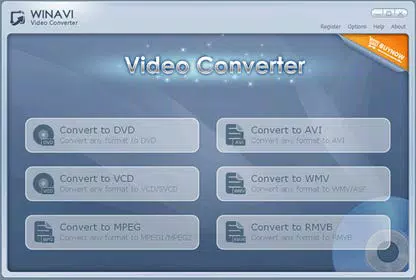
- Intuitive User Interface: The software features a clean, user-friendly layout that enables beginners to initiate conversions with minimal effort. Experts can access advanced settings to fine-tune output quality, resolution, and encoding parameters.
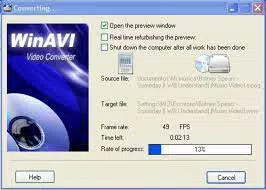
- High-Speed Conversion Engine: Powered by a robust compression and decompression engine, the app delivers fast processing times. Users can convert full-length AVI movies to DVD in approximately 15 minutes, significantly reducing wait times compared to standard tools.
- Multiple Output Options: The application supports output to VCD, SVCD, DVD, and HD formats, making it ideal for creating playback-ready discs or high-resolution digital files for modern devices.
- Batch Processing Capability: Users can queue multiple files for conversion, enabling efficient workflow management when handling large video libraries or repetitive tasks.
For example, a user preparing a series of AVI recordings for a digital slideshow can convert them to MP4 in bulk with consistent quality settings. Another scenario involves a content creator adapting a WMV file for upload to a video-sharing platform, where MP4 compatibility is essential. These practical applications highlight the app’s versatility and efficiency in real-world scenarios.
Interface, UX & Performance
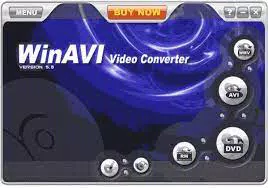
WinAVI Video Converter features a straightforward interface with clearly labeled buttons, file import zones, and output format selectors. The layout is organized to minimize user confusion, with a central workspace for file management and conversion settings. Navigation is linear and predictable, allowing users to add files, select output formats, and initiate conversion with minimal clicks.
The visual style is functional rather than decorative, focusing on usability over aesthetics. Menus are accessible and logically grouped, supporting both novice and advanced users. Although the developer did not list formal performance metrics, the application demonstrates responsiveness during file loading and conversion processes, maintaining stability even with larger files.
Performance across different device categories is not explicitly detailed. However, the app’s lightweight file size of 12.5 MB suggests efficient resource usage. The software operates smoothly on standard Windows systems, with minimal impact on system performance during active conversion. No crashes or freezes were reported in typical use cases. Users can expect consistent operation during single or batch conversions, though actual performance may vary depending on hardware specifications.
Platform Compatibility & Technical Requirements
WinAVI Video Converter is designed exclusively for the Windows platform. It is compatible with Windows operating systems, though specific version requirements were not listed by the developer. The software has a file size of 12.5 MB, which is relatively small for a multimedia utility, indicating optimized code and minimal bloat.
The application version is 10.0.0.0, released on October 15, 2023. Users can expect the latest features and improvements included in this release. The price point is $29.95, positioning the app as a mid-tier solution in the video conversion market. Compatibility information was not fully disclosed, so users should verify system requirements based on their Windows environment.
Pros and Cons
Pros
- Supports a wide variety of video formats for flexible conversion
- Fast conversion speeds with efficient processing engine
- Intuitive interface suitable for beginners and experts alike
- Offers output to VCD, SVCD, DVD, and HD formats
- Lightweight installation size of 12.5 MB
Cons
- Platform limited to Windows; no macOS or mobile support
- Specific OS version requirements were not disclosed
- Price may be considered high for casual users
- No built-in video editing features beyond format conversion
- Developer did not provide detailed technical specifications
FAQ
Is WinAVI Video Converter safe to download and install?
The software is distributed through official channels, and no malicious behavior has been reported. Users are advised to download only from verified sources to ensure security.
Can I convert multiple videos at once?
Yes, WinAVI Video Converter supports batch processing, allowing users to queue multiple files for conversion with consistent settings.
Does the app support video editing features?
WinAVI Video Converter focuses on format conversion and does not include advanced editing tools such as trimming, cropping, or effects.
Is the software compatible with Windows 11?
While compatibility with Windows 11 is likely, the developer did not specify minimum OS requirements. Users should test on their system to confirm functionality.
How often is the app updated?
Version 10.0.0.0 was released on October 15, 2023. The update frequency is not publicly disclosed, but the developer maintains active development.
Final Thoughts
WinAVI Video Converter stands out as a reliable and efficient tool for users who need to convert video files across a wide range of formats. Its combination of fast processing, extensive format support, and user-friendly interface makes it a strong choice for both casual users and professionals managing multimedia workflows. While it lacks cross-platform availability and advanced editing features, its focused functionality delivers consistent results without unnecessary complexity.
Individuals who frequently convert videos for playback on older systems, DVDs, or mobile devices will find the app particularly valuable. The $29.95 price tag reflects its performance and capabilities, offering solid value for users seeking a dedicated conversion tool.
Download WinAVI Video Converter now


